Backend for the FlexDelivery24 delivery platform. This repository is a NestJS + Fastify application that exposes web, mobile, admin, and public APIs on top of a MySQL database, with a large set of migrations, seeders, and domain use cases.
This README is written for new developers joining the project. It focuses on:
The application is organized around a shared business layer and two client-facing API modules:
src/modules/shared: business logic, persistence, domain services, guards, filters, external integrationssrc/modules/web: web and admin controllerssrc/modules/mobile: mobile controllersCore stack:
The app also has integrations for Pusher, Paystack, Twilio, Smile ID, email providers, AWS S3, and OpenAI. Some of those are feature-level, but a few are still wired as boot-time dependencies, so see the environment section carefully.
src/: application sourcescripts/: migration helpers, reset helpers, and one-off seed runnerstest/: E2E-style tests and helpersdocs/: additional project documentationpublic/: static file storage served under /assets/dist/: compiled output after npm run buildsrc/src/
├── app.module.ts # Root module
├── main.ts # Bootstraps Fastify, Swagger, static assets, filters
├── config/ # Env validation, app config, TypeORM config
├── database/
│ ├── migrations/ # TypeORM migrations
│ └── utils/ # Migration helpers
├── modules/
│ ├── shared/
│ │ ├── application/ # DTOs, mappers, use cases
│ │ ├── domain/ # Domain services and contracts
│ │ ├── infrastructure/ # Repositories, entities, external providers, cron jobs
│ │ ├── common/ # Enums, decorators, utils
│ │ ├── errors/ # Custom error types
│ │ └── presentation/ # Guards, filters, interceptors, middleware
│ ├── web/ # Web/admin/public controllers
│ └── mobile/ # Mobile controllers
└── types/ # Shared TS types
When you need to trace or change behavior, this is the pattern to follow:
src/modules/web/controllers or src/modules/mobile/controllers.src/modules/shared/application/use-cases.src/modules/shared/infrastructure.src/modules/shared/infrastructure/persistence/entities and migration files in src/database/migrations.In practice:
There is no single central routing file for the API surface.
routes/ folders in src/modules/web/routes and src/modules/mobile/routes are placeholders.@Controller(...) decorator.api/v1/web/... or api/v1/mobile/....jobs, delivery-offers, admin/cron, or pusher.For that reason, when you are debugging or adding endpoints, trust controller decorators over module README files or route placeholders.
/: renders this README.md as HTML through ReadmeController/api-docs: Swagger UI/health: application health checks/assets/...: static files from public/The diagrams below are intended to make onboarding faster. They map the current implementation, not just the intended design. For the larger schema reference, see database-design.md (which now also contains the full ERD, merged 2026-08-20).


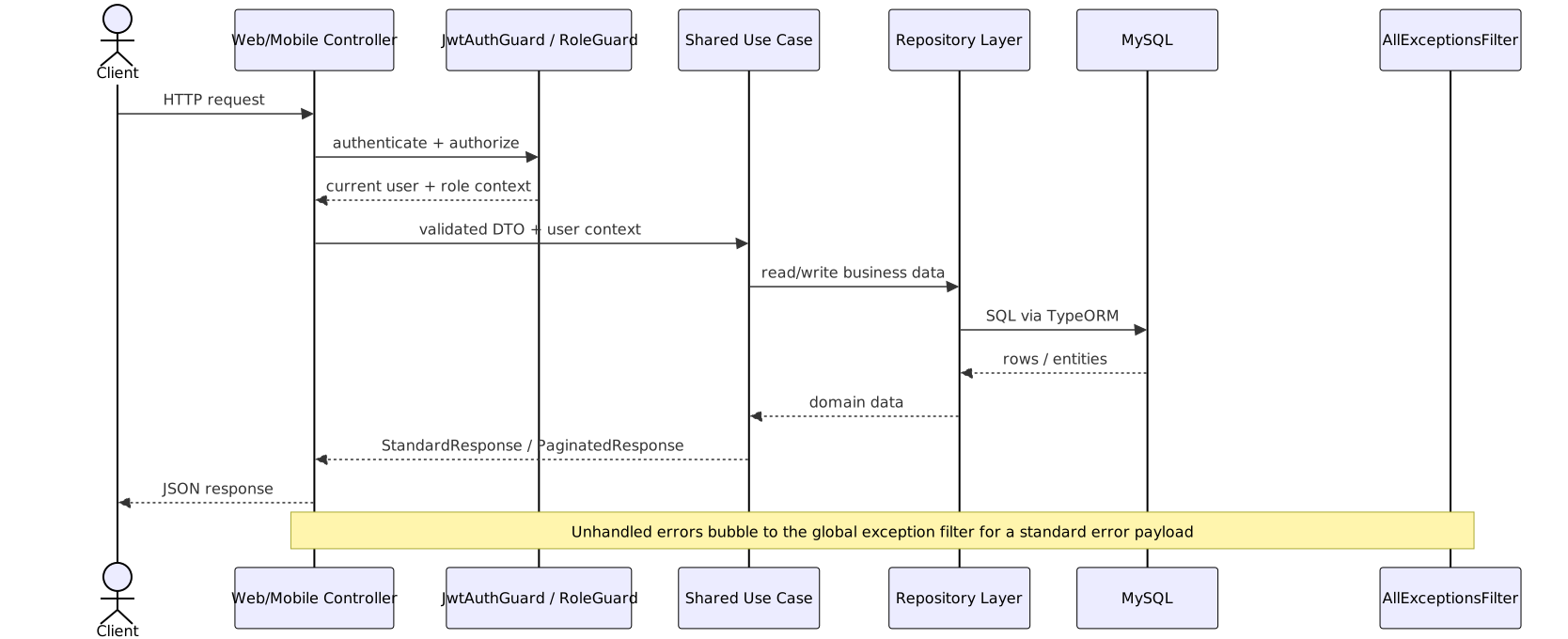
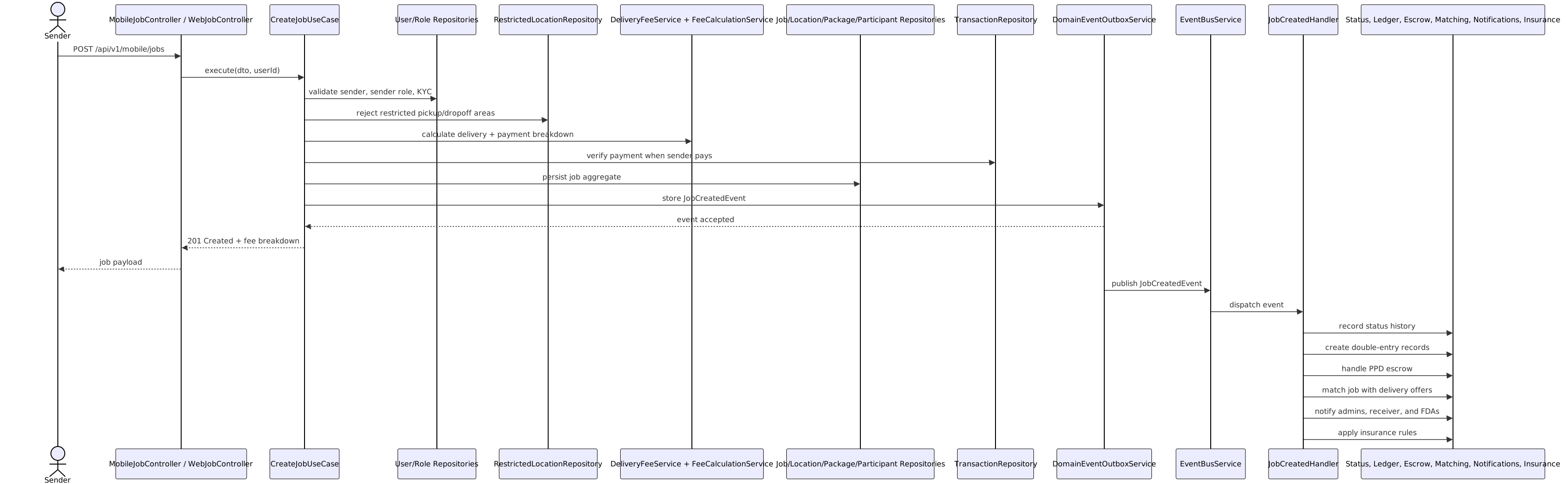


database-design.md (ERD section).public/diagrams/.Install these first:
Why Node 24? The CI workflow uses Node 24 and this repo has no .nvmrc, so matching CI is the safest default.
This repo does not include Docker Compose files, so MySQL and Redis are expected to be running outside the repository.
Use the same install style the CI workflow uses:
npm install --legacy-peer-deps
The app loads environment variables from:
.env.local.envThat means .env.local overrides .env when both exist.
Start with:
cp .env.example .env.local
Then add the values below. This matters because .env.example is not fully sufficient for a local boot today.
These are required either by env validation or by modules that call getOrThrow(...) during startup:
NODE_ENV=development
PORT=3000
API_PREFIX=/api/v1
CORS_ORIGIN=http://localhost:3000,http://localhost:5173

DB_HOST=127.0.0.1
DB_PORT=3306
DB_USERNAME=root
DB_PASSWORD=
DB_NAME=flex_delivery

REDIS_HOST=127.0.0.1
REDIS_PORT=6379
REDIS_PASSWORD=
REDIS_DB=0

PUSHER_APP_ID=local
PUSHER_KEY=local
PUSHER_SECRET=local
PUSHER_CLUSTER=mt1

SMILE_ID_API_KEY=local
SMILE_ID_PARTNER_ID=local

EMAIL_PROVIDER=nodemailer
SMTP_HOST=localhost
SMTP_PORT=1025
SMTP_USER=local
SMTP_PASSWORD=local
SMTP_FROM_EMAIL=dev@flexdelivery24.local
SMTP_FROM_NAME=FlexDelivery24 Dev

JWT_SECRET=dev-jwt-secret
JWT_REFRESH_SECRET=dev-refresh-secret
DEFAULT_OTP=123456
Notes:
REDIS_HOST and REDIS_PORT are currently needed by RedisService, even though they are missing from .env.example.getOrThrow(...).API_PREFIX exists in config, but most controllers currently hardcode their own api/v1/... prefixes. Do not assume changing API_PREFIX will re-prefix the whole app.Add these when you need the corresponding integrations:
PAYSTACK_SECRET_KEY, PAYSTACK_PUBLIC_KEYTWILIO_ACCOUNT_SID, TWILIO_AUTH_TOKEN, TWILIO_PHONE_NUMBERAWS_ACCESS_KEY_ID, AWS_SECRET_ACCESS_KEY, AWS_REGION, AWS_S3_BUCKETOPENAI_API_KEY and related OpenAI settingsCreate the local database before running migrations:
CREATE DATABASE flex_delivery
  CHARACTER SET utf8mb4
  COLLATE utf8mb4_unicode_ci;
Apply the schema:
npm run migration:run
Useful related commands:
npm run migration:show
npm run migration:revert
npm run migration:run:batch
Use migration:run:batch if your machine or target environment is memory-constrained.
For the easiest local setup, use the comprehensive seeder:
npm run seed:all
This populates lookup data, users, jobs, rewards, payments, marketplace data, notifications, disputes, and more.
If you only need admin access, you can run the smaller admin seed after roles exist:
npm run seed:roles
npm run seed:admin-users
Default admin credentials created by seed-admin-users:
admin@flexdelivery24.com / Admin@123superadmin@flexdelivery24.com / Admin@123The seed script itself warns that these passwords should be changed after first login.
For local development:
npm run start:dev
Other modes:
npm run start
npm run start:debug
npm run build
npm run start:prod
After boot, check:
http://localhost:3000/http://localhost:3000/api-docshttp://localhost:3000/healthIf you want the shortest path from clone to running API:
cp .env.example .env.local
# add Redis, Pusher, Smile ID, and SMTP values to .env.local

npm install --legacy-peer-deps

# create the flex_delivery database first
npm run migration:run
npm run seed:all
npm run start:dev
npm test
npm run test:watch
npm run test:cov
There are repo-level specs under src/ and E2E specs under test/.
npm run test:e2e
Important: the more realistic E2E flow in test/job-flow.e2e-spec.ts expects:
The test helpers support overriding credentials and base URL via env vars:
TEST_API_URLTEST_SENDER_PHONETEST_SENDER_PASSWORDTEST_SENDER_ROLETEST_FDA_PHONETEST_FDA_PASSWORDTEST_FDA_ROLETEST_RECEIVER_PHONEExample:
npm run start:dev
In another terminal:
TEST_API_URL=http://localhost:3000 npm run test:e2e -- --testPathPatterns=job-flow --verbose --forceExit
Note: test/app.e2e-spec.ts still looks like the default Nest scaffold and does not reflect the current root route behavior, so test/job-flow.e2e-spec.ts is the better reference when you want a realistic manual or automated flow.
npm run start:dev
npm run build
npm run lint
npm test
npm run test:e2e
npm run migration:run
npm run migration:show
npm run seed:all
Other useful one-offs:
npm run db:clearnpm run seed:admin-usersnpm run seed:users-comprehensivenpm run seed:jobsnpm run seed:paymentsThe usual workflow is:
src/modules/shared/application/dto.src/modules/shared/application/use-cases.src/modules/shared/infrastructure.src/modules/web/controllers and/or src/modules/mobile/controllers.src/modules/shared/shared.module.ts if needed.Look in this order:
Look in this order:
@Controller(...)@Get, @Post, @PutDo not start with the routes/ folders; they are effectively placeholders today.
src/modules/shared/README.mdsrc/modules/web/README.mdsrc/modules/mobile/README.mdsrc/database/README.mdfolder-structure.mddatabase-design.mdSome of those documents are helpful for architecture context, but the source code should be treated as the final authority where docs and implementation differ.
.env.example is missing some values that the app currently expects at boot, especially Redis.API_PREFIX.If you are brand new to the repo, start here:
src/main.tssrc/app.module.tssrc/modules/shared/shared.module.tssrc/modules/web/controllers or src/modules/mobile/controllerssrc/modules/shared/application/use-casesThat path will give you the fastest mental model of how the app is put together.